
Choosing a Video Measuring System for Your Application
2026-10-07
When it comes to quality control and precision measurement, choosing a video measuring system can feel overwhelming—especially with so many options on the market. Many engineers end up with a system that's either overkill for their budget or lacks the accuracy their parts demand. Before you make a decision, it's worth digging into what your application truly requires. At JATEN, we've helped countless teams navigate this process, and in this post, we'll break down the key factors to consider.
Matching Magnification to the Features You Actually Measure
Many operators reach for the highest magnification out of habit, assuming more detail always helps. But if the features you need to resolve are only a few hundred microns across, pushing to 50x or 100x often narrows the field of view so much that you lose context and spend extra time repositioning. Start by listing the actual dimensions and tolerances of the features—pores, grain boundaries, micro-cracks, coating thickness—and pick a magnification that makes those features occupy about a third to half of the frame, not the entire screen.
There is also a real cost in depth of field and lighting consistency. Higher magnification reduces the vertical range that stays acceptably sharp, so slightly curved or tilted surfaces will look blurry at the edges unless you stack images or constantly refocus. If you only need to verify whether a solder joint is present or a fiber orientation is uniform, a moderate magnification with a longer working distance may give you a more reliable measurement than a high-power objective that amplifies every vibration and minor stage drift.
The goal is not to make the sample look impressive on screen, but to match the optical resolution to the size of the signal you are actually quantifying. Before changing objectives, ask what the smallest feature is that must be distinguished from its background, and whether the current lens already exceeds that requirement by a comfortable margin. Often, stepping down in magnification improves contrast, speeds up the workflow, and reduces the chance that you are measuring optical artifacts instead of the sample itself.
Why Your Shop’s Temperature Swing Matters More Than You Think
Most shop owners fixate on the average temperature, but the swing between day and night does far more damage. When your space swings ten or fifteen degrees every afternoon, materials expand and contract at different rates. Wood floors cup, adhesives let go, and electronics quietly wear themselves out. Customers feel it too: a muggy morning followed by a chilly blast from the AC can turn a browse into a quick exit.
The fix isn't just a bigger thermostat setting. It's about slowing the rate of change. Thermal mass like concrete or thick shelving absorbs heat throughout the day and releases it after closing, keeping the curve flat. Even simple blinds or an awning over a south-facing window can cut the afternoon spike dramatically. Once you stop chasing the peak and start managing the transition, the space feels more stable and your products last longer.
There's also a hidden cost in your energy bill. Systems that constantly ramp up to fight a sudden heat load run inefficiently, often for hours at a time. A slower, steadier approach uses less power and avoids the wear of constant cycling. Pay attention to when your temperature moves, not just where it lands, and you'll see the difference in both comfort and cash.
The Case for Programmable Lighting Over Default Settings
Default lighting settings are built for a generic room, not the specific way you live in yours. They ship with conservative brightness, fixed color temperatures, and rigid schedules that ignore how light shapes your mood and focus. Programmable lighting flips that: you can tune intensity and hue to match the moment—cool and crisp for morning work, warm and soft for winding down—so a one-size-fits-all fixture becomes a tool that actually suits your day.
Defaults also treat every hour the same, which is rarely how real spaces work. A brightness that feels fine at noon can be glaring at 10 p.m., and a static color temperature can make a kitchen feel clinical or a bedroom feel flat. Programmable setups let you set scenes and gradual transitions that follow your routines: lights can ease on with your alarm, drop to a lower, less harsh level during late-night screen time, or dim automatically when you start a movie. That kind of control isn’t a gimmick—it removes daily friction and makes the room work harder for you.
There’s a practical side too. Default settings often leave lights running at full output when you don’t need them, wasting energy and wearing out bulbs faster. With programmable lighting, you can set occupancy-based dimming, schedule lights to match daylight, or turn off unused zones automatically, cutting consumption without making the space feel dim. Once the scenes are dialed in, you stop fighting with switches and apps—the lighting just does what you want, which is a strong reason to leave the factory defaults behind.
When a Benchtop System Beats a Floor Model
Space is often the first thing people mention, but the real advantage of a benchtop system usually shows up in how naturally it fits into the rhythm of a smaller lab. Rather than walking across the room to a dedicated floor unit, you keep the instrument within arm's reach of the bench where samples are prepared. That simple change cuts down on unnecessary movement and makes it easier to run short, frequent batches without feeling like each run needs to justify itself.
Maintenance and service are another quiet tipping point. Floor models are machines you tend to plan around; they demand more room for airflow, longer cool-down cycles, and service visits that can block an entire corner of the lab. Benchtop systems, by contrast, are designed to be pulled out, checked, and put back into service quickly. When something does go wrong, the fix rarely requires shutting down a whole workflow. For many teams, that uptime matters more than raw throughput.
There is also the question of how the equipment shapes the work itself. A floor model often becomes a shared resource with sign-up sheets and batch queues. A benchtop unit stays close to the people actually doing the assay, which encourages more iterative testing and faster feedback. It is not about being more powerful; it is about being present when you need it. In that sense, the benchtop system wins not on spec sheets but on the way it disappears into the background of a well-run lab.
What Your CAD Files Reveal About the Right Software
Your CAD file extensions aren't just labels—they're clues. A .dwg file with complex dynamic blocks and sheet sets suggests you need software that fully supports AutoCAD's proprietary object model, not a lightweight viewer. Conversely, if you're mostly handling .step or .iges files, you're likely dealing with neutral formats meant for cross-platform collaboration, so a tool with robust import/export and geometry healing is more valuable than one packed with drafting shortcuts.
The internal structure of the file matters too. Large assemblies saved as native SolidWorks or Inventor files will choke applications that don't handle feature trees or parametric constraints well. On the other hand, mesh-based files like .stl or .obj point toward 3D printing or visualization workflows, where precise NURBS modeling isn't the priority—mesh repair, scaling, and polygon reduction are.
Even version numbers embedded in files can guide your choice. If you constantly receive CAD files from suppliers in formats two or three releases ahead of your current software, you need a solution known for aggressive file format support and frequent updates. Ignoring these file-driven signals often leads to frustrated workarounds, broken references, and wasted hours re-modeling geometry that should have opened cleanly.
Negotiating Accuracy Specs: Reality vs. Marketing Numbers
When a vendor hands you a spec sheet that boasts micron-level precision or six-sigma repeatability, your first move shouldn't be to marvel at the numbers. Ask how those figures were actually measured, under what thermal and load conditions, and over how many cycles. Marketing teams love to quote best-case lab results, but your production floor rarely runs at 22°C with zero vibration. A useful habit is to request raw test data or a gage R&R study rather than a glossy summary—real accuracy lives in the spread, not the headline.
Negotiating specs comes down to separating what the machine can do once from what it will do at 2 a.m. on a Friday after three shift changes. Push the supplier to define accuracy in terms of your part, your fixture, and your tolerance stack. For example, a CNC lathe might advertise ±0.005 mm positioning, but if your workpiece deflects under clamping or the shop temperature swings eight degrees, you'll never see that number. Ask for a test cut on your material, with your tooling, and measure the actual capability index (Cpk) over a meaningful run—not a five-part demo.
Finally, treat the spec negotiation as a conversation about risk, not just performance. If a vendor insists their advertised accuracy is achievable, ask what happens when it isn't: who pays for scrap, rework, or downtime? Tie the quoted specs to contractual acceptance criteria, ideally with a first-article inspection and periodic process checks. The goal isn't to nickel-and-dime the numbers downward; it's to align the marketing language with the operational reality you'll live with every day.
FAQ
Look at feature size, reflectivity, and edge contrast. Small, flat, or thin parts with well-defined edges work well. Highly reflective or transparent surfaces may need special lighting or coating. If you need to measure depth or internal features, check whether the system supports probe or laser options.
Lighting is probably the biggest variable. Programmable LED ring lights, coaxial lights, and backlights each reveal different edges. If the illumination isn't stable, measurements shift even when the part hasn't changed. Test with your actual parts before committing.
Neither alone guarantees good results. A high-resolution camera on a sloppy stage still produces bad data. Mechanical accuracy of the XY stage and Z axis matters as much as pixel count, especially for larger parts. Ask for a spec sheet that separates optical resolution from stage accuracy.
Quite important. The software controls edge detection, feature recognition, and reporting. Bad software makes simple tasks tedious. Look for a package that handles your most common measurements with minimal programming and can export data the way your shop actually uses it.
Manual systems suit low-volume or mixed-batch work where setup time dominates. Automation helps when you measure hundreds of identical parts, need unattended operation, or want to remove operator variability. Consider whether the extra cost will be recovered through faster throughput.
Regular cleaning of optics and stage, plus periodic calibration with a traceable standard, keeps the system reliable. Some systems self-calibrate or include a calibration artifact. Ask about annual service costs and whether your in-house team can handle basic upkeep.
Conclusion
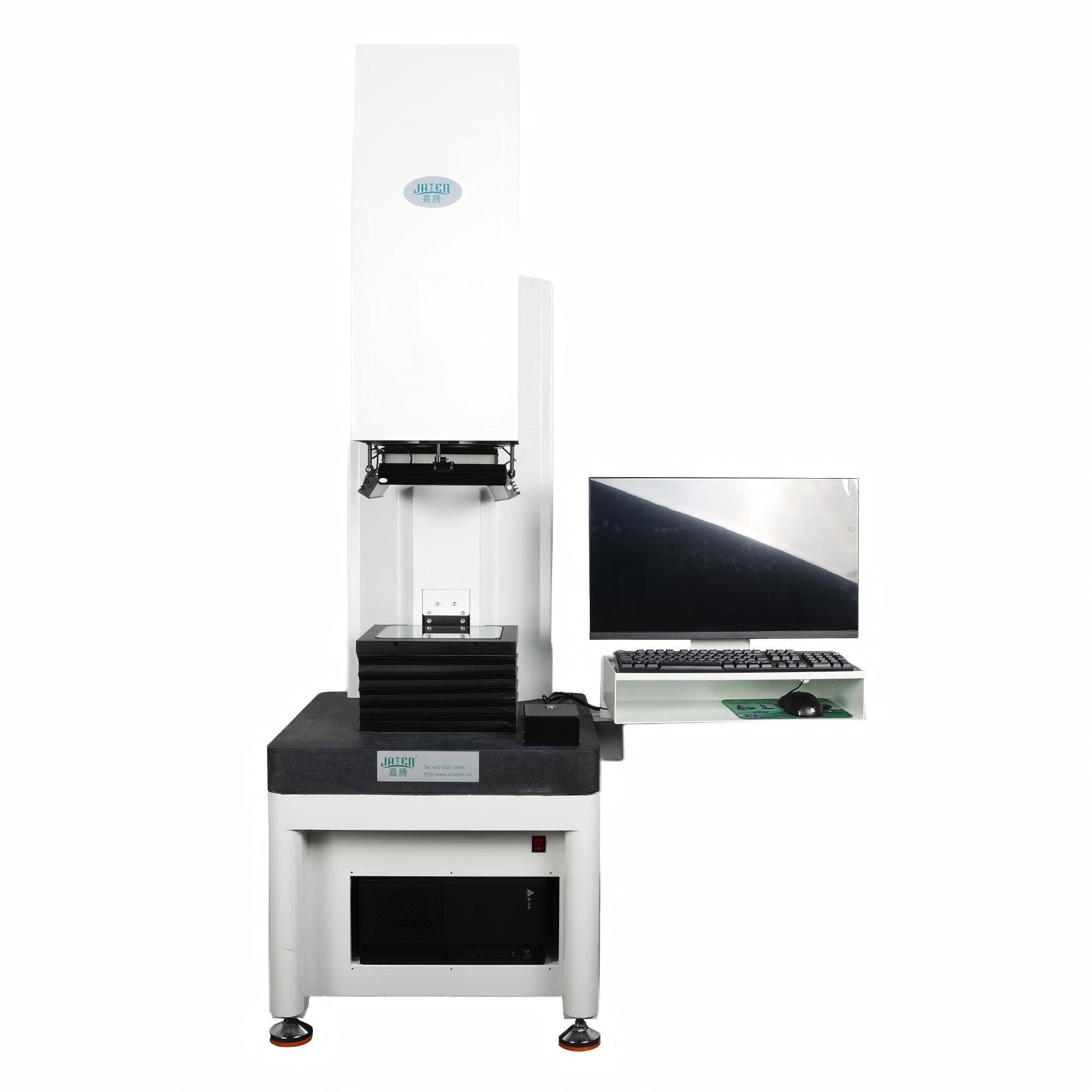
Choosing a video measuring system starts with knowing the actual feature sizes you inspect, not just the machine's maximum magnification. Many shops overpay for extreme zoom they rarely use, while missing the need for stable thermal conditions—temperature swings of even a few degrees can shift measurements on long parts, so a benchtop unit in a climate-controlled corner often outperforms a floor model in an open bay. Lighting deserves equal attention: programmable LED sectors let you isolate edges, holes, and surface defects that default ring lights wash out. Choosing optics that match the features you actually inspect, instead of chasing maximum zoom on a spec sheet, keeps the system both affordable and effective.
The benchtop-versus-floor decision is usually about rigidity and proximity to the part, not just footprint. Your CAD files also hint at software needs: if you import GD&T callouts or compare scan data to nominal models, you will want a package that handles those natively rather than bolting on third-party tools. Finally, accuracy specs demand skepticism—marketing numbers often assume lab-perfect temperature, fixturing, and single-feature measurements. Ask for repeatability on your real parts, under your shop's conditions, and test a worst-case feature before signing. Negotiating the gap between published accuracy and day-to-day reality is where a smart purchase is made.
Contact Us
Contact Person: Volien
Email: [email protected]
Tel/WhatsApp: +86 18029161762
Website: https://www.jatentech.com/